续 《如果你想使用这套 WordPress 主题》,最近更新了博客的 CSS 设置,分享给有需要的朋友。
整体设计以文字为主,少装饰性元素。不用颜色引导,而用灰阶节奏和留白。
ChatGPT 辅助设计,有问题可以帮忙反馈在评论区!
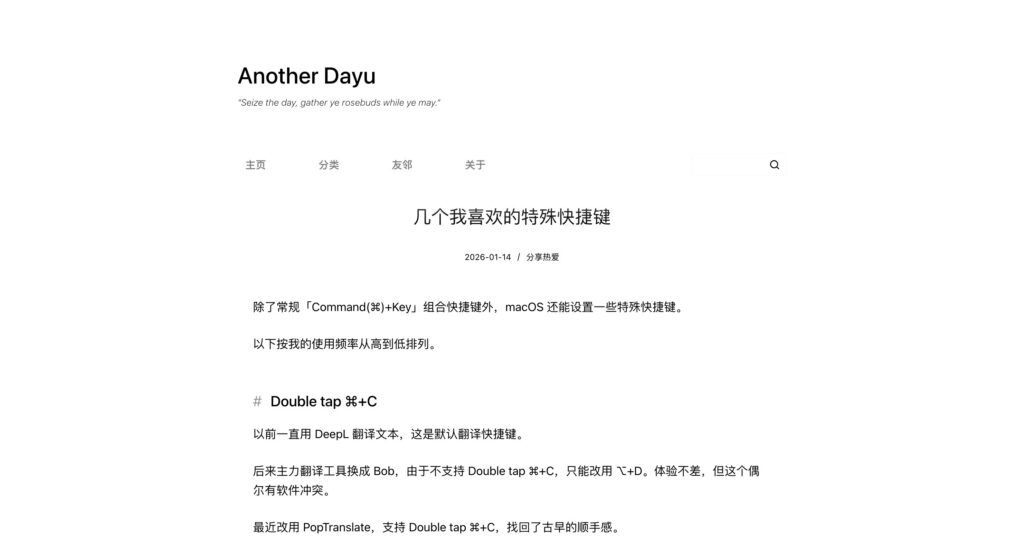
以下是完整 CSS:
这个以外,还有什么值得添加的css?/* ---------- 正文链接 ---------- */
.entry-content a {
  text-decoration: underline;
  text-decoration-thickness: 1px;
  text-underline-offset: 0.15em;
}

.entry-content a:hover {
  text-decoration-thickness: 2px;
}

/* ---------- 正文标题(只影响文章内容区) ---------- */
.entry-content h1,
.entry-content h2,
.entry-content h3,
.entry-content h4,
.entry-content h5,
.entry-content h6 {
  font-weight: 500;
  line-height: 1.35;
  color: #000;
  letter-spacing: 0;          /* 标题不拉字距,更凝聚 */
  margin: 2.4em 0 0.9em;
  text-indent: 0;
  position: relative;         /* 为伪元素做准备 */
}

/* h1:正文中不鼓励使用,视觉上降级 */
.entry-content h1 {
  font-size: 1.35rem;
  text-align: left;
  margin: 2.2em 0 1em;
}

/* h2:章节级标题(使用 # 作为结构标记) */
.entry-content h2 {
  font-size: 1.32rem;
  padding-left: 1.2em;        /* 给 # 留空间 */
  margin-top: 2.6em;
}

.entry-content h2::before {
  content: "#";
  position: absolute;
  left: 0;
  top: 0;
  color: #999;                /* 弱化为结构提示,而非主视觉 */
  font-weight: 400;
}

/* h3:小节标题(不再重复符号,保持克制) */
.entry-content h3 {
  font-size: 1.15rem;
  color: #222;
  margin-top: 1.9em;
}

/* h4 / h5 / h6:提示级标题 */
.entry-content h4,
.entry-content h5,
.entry-content h6 {
  font-size: 1.02rem;
  color: #333;
  font-weight: 500;
  margin-top: 1.6em;
}
其实我觉得首段缩进没有必要,阅读起来反而更别扭。
参考知乎: https://www.zhihu.com/question/539160773
过把瘾 hhh
另外,知乎里这篇末尾还挺支持首段缩进,长文时对阅读体验有明显提升。
一开始喜欢在 blocksy 的自定义中模块化地调整,后来发现还是得自定义 CSS 才能满足自己的需求 😮💨
各有各的好处 hhh
现在是越来越庆幸自己最开始用的 Blocksy
好几种字体
博主博主,深色模式下有些文字是黑色的,在灰色背景下看不太清除,比如这个评论的文本框~